Metronome
A lighter, single-screen click — built to drop into a loop or a routine step without pulling you away from what you were doing.
Metronome and Pulse are the same click, wearing two outfits. Under the hood there's one engine, and only ever one click running — start it in one place and it's the same beat you'd hear in the other. What differs is the outfit: Pulse is the full-featured "keep time" home, the tab you'll actually live in day to day. Metronome is a stripped-down utility that lives inside the Practice Hub, built for moments when you need a click right here — mid-loop, mid-routine — without leaving the flow you were already in.
That's the mental model to keep: if you're sitting down specifically to work on time, reach for Pulse. If you're in the middle of something else and just need a beat to lock onto, Metronome is what shows up.
Where it lives
Metronome is one of the tool tiles in the Practice Hub — tap it and it opens as its own screen, not a tab. You'll also run into it secondhand: it's the same tool that surfaces inside a loop player or as a step in a routine, already ticking at whatever tempo that context set.
What's on the screen
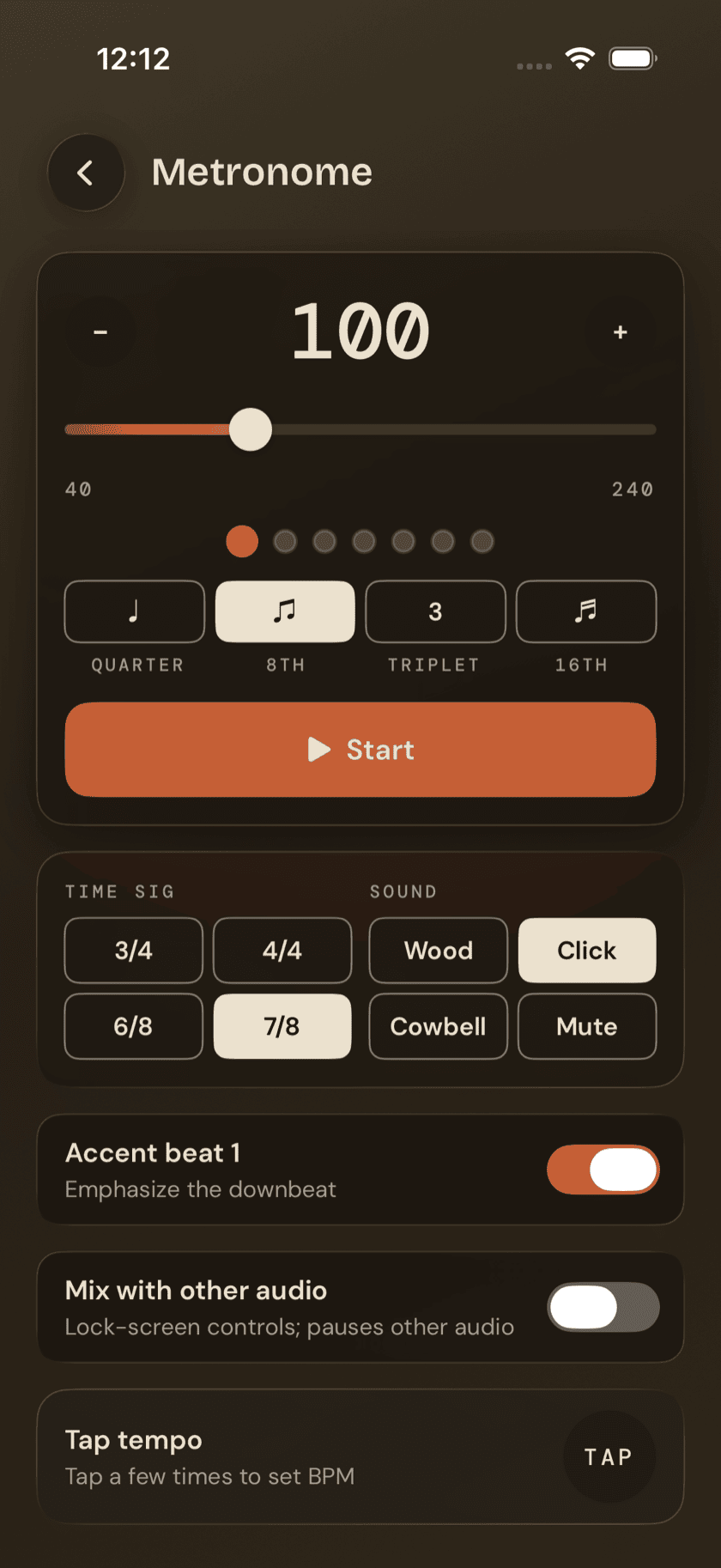
Metronome keeps everything on one page — no settings sheet to dig into:
- A BPM readout with −/+ steppers. Tap to nudge the tempo one beat at a time — no press-and-hold acceleration here, so getting from 60 to 180 takes a lot of tapping or a drag on the slider instead.
- A tempo slider, running 40–240 BPM.
- Beat dots that light up in time, so you've got a visual alongside the click.
- The same four-symbol subdivision row as Pulse — quarter, 8th, triplet, 16th.
- Start/Stop.
- A combined time-signature and sound-tone options grid.
- An Accent beat 1 toggle and a Mix with other audio toggle, sitting right on the main screen.
- A standalone tap-tempo card, for when you'd rather feel a tempo out than dial it in.
Accent beat 1 and Mix with other audio exist in Pulse too, but they're tucked inside Pulse's settings sheet. Metronome puts both right on the main screen — there's nowhere else to put them, since this screen doesn't have a settings sheet at all.
Time signature and sound
The options grid covers four time signatures — 3/4, 4/4, 6/8, and 7/8 — a narrower set than Pulse, which offers seven quick picks and a custom-meter editor behind them. One thing worth calling out directly: there's no 7/8 grouping toggle here. Pulse lets you choose how a 7/8 bar accents internally; Metronome doesn't offer that choice, so 7/8 on this screen always accents beat 1 only and nothing else.
Metronome isn't trying to be a complete meter reference — that's Pulse's job. It covers the handful of signatures you're likely to need mid-practice and leaves the deeper options where you'd go looking for them on purpose.
What Pulse has that Metronome doesn't
Worth being direct about this, since the two tools look similar at a glance. Metronome doesn't have:
- Gap click (muting the click on a cycle to test your internal time)
- Tempo ramp (gradually speeding up over a set stretch)
- The visual pulse glow Pulse displays
- Press-and-hold acceleration on the BPM steppers
- Pulse's wider 30–300 BPM range, its seven quick-pick signatures, and the custom-meter editor behind them
- The grouping toggle that says how an odd bar is counted
- Persisted settings — Metronome doesn't remember your tempo, signature, or sound choice once you leave the screen
That last point is easy to trip over. Set Metronome to 96 BPM in 6/8, back out, come back later, and it's reset to its defaults — not what you left it at. Pulse, by contrast, remembers exactly where you left it. If a setting needs to stick around, that's a sign you want Pulse, not Metronome.
Showing up already set
Metronome has one more trick: it can be opened already dialed to a specific tempo and handed off to another screen's control. That's exactly how it appears inside a loop player or as a routine step — it doesn't ask you to set a tempo, it quietly matches whatever the surrounding context is already using. Combined with the lack of persisted settings, this is really the whole point of the tool: Metronome isn't meant to hold state of its own. It's meant to borrow whatever tempo the moment calls for, give you a click, and get out of the way when you're done.
Sit down and play.
Learn grooves, capture ideas, jam with a live band, and keep time — free, local-first, on iPhone, iPad, and Mac.
Explore Drum Buddha →