Coordination
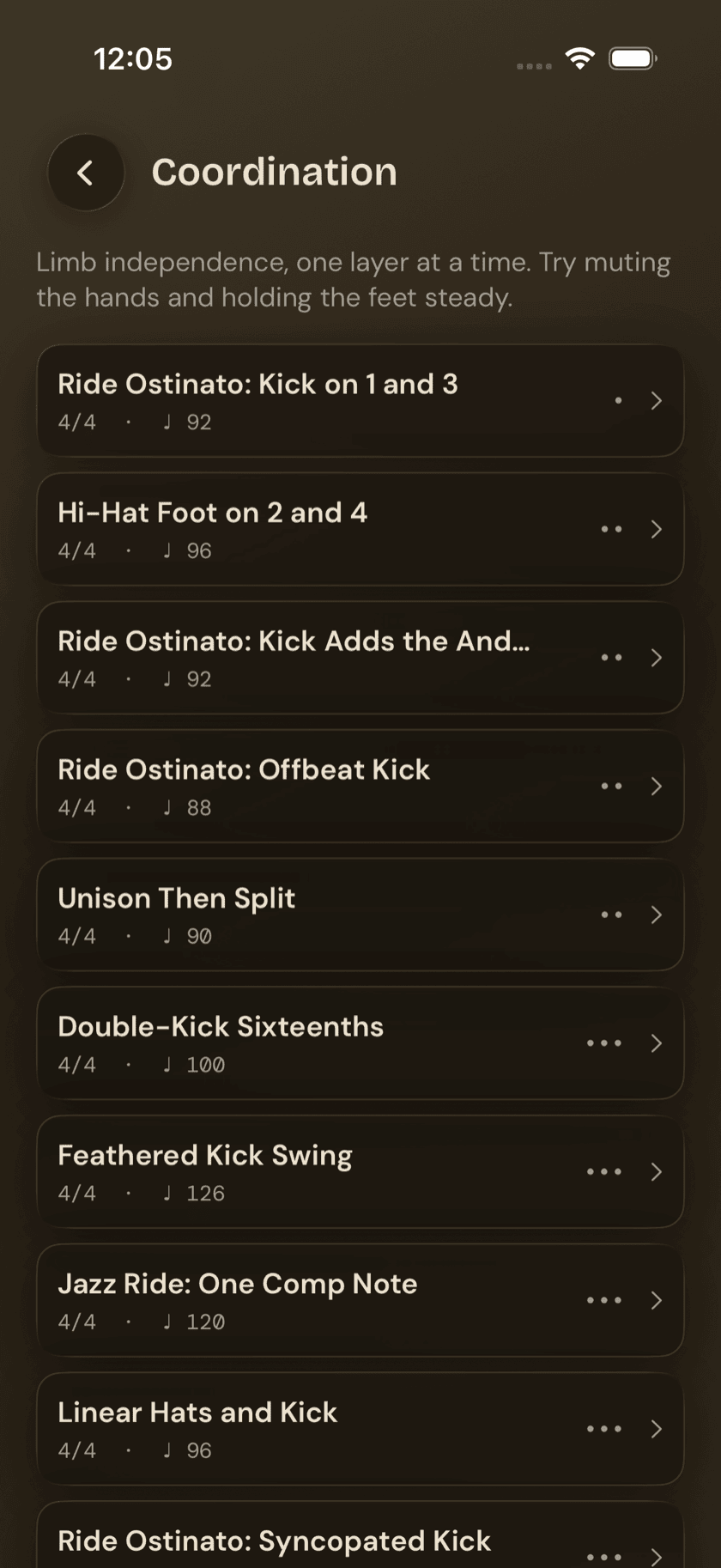
Sixteen patterns built to train one specific skill — keeping your hands and feet doing genuinely different things at the same time.
Coordination is drumming's core problem, dressed up as a practice category. Everything else in the app — grooves, fills, rudiments — eventually comes down to your four limbs holding independent parts without one dragging another off course. This page is where that gets isolated and drilled on its own, instead of buried inside a groove you're also trying to learn for other reasons.
The screen's own subtitle says it plainly: Limb independence, one layer at a time. Try muting the hands and holding the feet steady.
Where coordination entries live
Coordination isn't a separate catalog any more than Fills is. Drum Buddha's pattern library is one set of grooves, and 16 of them are tagged coordination rather than groove or fill. Tap into any of them and you land on the same groove detail screen you'd get from Grooves or Fills — same notation, same transport, same per-voice muting. If you haven't spent time on that screen yet, Grooves covers it in full; nothing about it changes because you got here through Coordination.
Muting to isolate a layer
This is the one tool on the detail screen that earns its keep here more than almost anywhere else in the app: mute and solo, per instrument voice. A coordination pattern usually stacks two or three things at once — a ride pattern, a kick ostinato, a snare comp — and trying to absorb all of them together is exactly the trap this page exists to get you out of.
Mute the hands and you're left with just the feet — kick and hi-hat, on their own, at tempo. Get that locked in until it stops taking conscious effort, then unmute one part at a time and add it back on top. On a Jazz Ride entry, that usually means isolating the ride-and-kick ostinato first, getting it steady, and only then bringing the snare comping in over it.
Muting doesn't touch the notation. The full pattern stays on screen the whole time, so you can still read the part you've silenced while you play it from memory.
The list
Same row layout as Grooves and Fills: name, time signature, default BPM, difficulty dots. A handful worth knowing by name, in rough order of difficulty:
| Entry | Difficulty | Style |
|---|---|---|
| Ride Ostinato: Kick on 1 and 3 | 1 | — |
| Hi-Hat Foot on 2 and 4 | 2 | — |
| Ride Ostinato: Kick Adds the And of 2 | 2 | — |
| Ride Ostinato: Offbeat Kick | 2 | — |
| Unison Then Split (2 bars) | 2 | — |
| Jazz Ride: One Comp Note | 3 | — |
| Ride Ostinato: Syncopated Kick | 3 | — |
| Double-Kick Sixteenths | 3 | Metal |
| Samba Foot Ostinato | 4 | Latin |
| Jazz Ride: Skip-Note Comps | 4 | — |
| Jazz Ride: Offbeat Triplet Comps | 4 | — |
| Linear Funk | 5 | Funk |
The low end starts as simply as coordination gets — Ride Ostinato: Kick on 1 and 3 is one steady hand pattern against a kick that only moves twice a bar. From there, the Ride Ostinato family keeps the hand part fixed and makes the kick part progressively less predictable — landing on the and of 2, then syncopated — which isolates one variable at a time instead of changing everything at once. The Jazz Ride entries work the same idea from the other direction, holding the foot part steady while the comping gets sparser and less regular. Linear Funk, at difficulty 5, is the hardest entry in the whole catalog.
Unison Then Split is two bars long, not one — that's the point of the pattern. Bar one lands everything together; bar two pulls it apart. The coordination demand is the contrast between the two, not either bar on its own.
Sit down and play.
Learn grooves, capture ideas, jam with a live band, and keep time — free, local-first, on iPhone, iPad, and Mac.
Explore Drum Buddha →